If you’re an Etsy seller or print-on-demand creator, you know that getting noticed goes far beyond just posting great listings. Building real visibility and consistent sales now means blending keyword research, competitive intel, optimized listings, and smart campaigns. Sale Samurai provides exactly the smart tools needed at each stage—no guessing, just data-backed action.
Below, you’ll find a complete marketing workflow—from niche discovery to campaign optimization—using only features built into Sale Samurai. You’ll learn step-by-step how to make marketing easier, faster, and far more strategic.
1. Why Etsy SEO Alone Isn’t Enough
Etsy is placing more pace on search relevance and trending niches than ever before. Sellers who rely only on internal Etsy search risk being buried under noise. External visibility via optimized content, influencer posts, email gifts, and platform awareness is now the biggest driver of consistent Etsy sales. Sale Samurai bridges this gap by providing the live keyword intelligence, pricing insights, and competitor benchmarks needed to help you rank and resurface listings daily—even when Etsy traffic drops.
2. Discovering Low-Competition, High-Intent Keywords
Keyword and Listing Research Tools
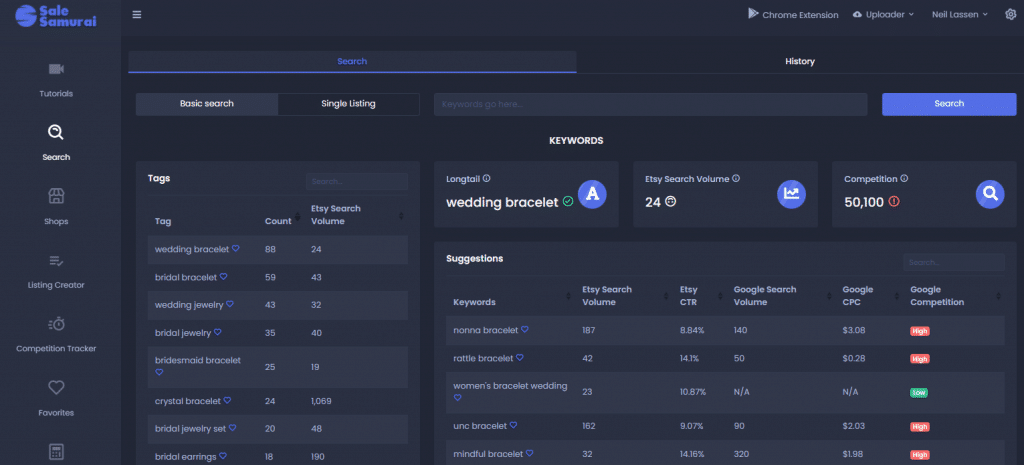
- Basic Search Tool: Paste seed phrases (e.g. “cat planner”) to uncover real-time data on monthly volume, competition grade (A–E), price spread, shipping days, sales per month, views per listing, and related long-tail phrases.
- Chrome Extension: Instantly fetch the same stats directly on Etsy search results. Search any keyword—Samurai overlays volume and competition below each suggestion. You can sort, filter, and export right from the extension popup.
These tools let you quickly discover high-conversion keyword paths, even in niche markets like “2026 planner printable” or “cat care log” with search volume <1,000 and fewer than 100 listings.
3. Benchmarking Competition & Finding Gaps
Competitor and Keyword Tracker
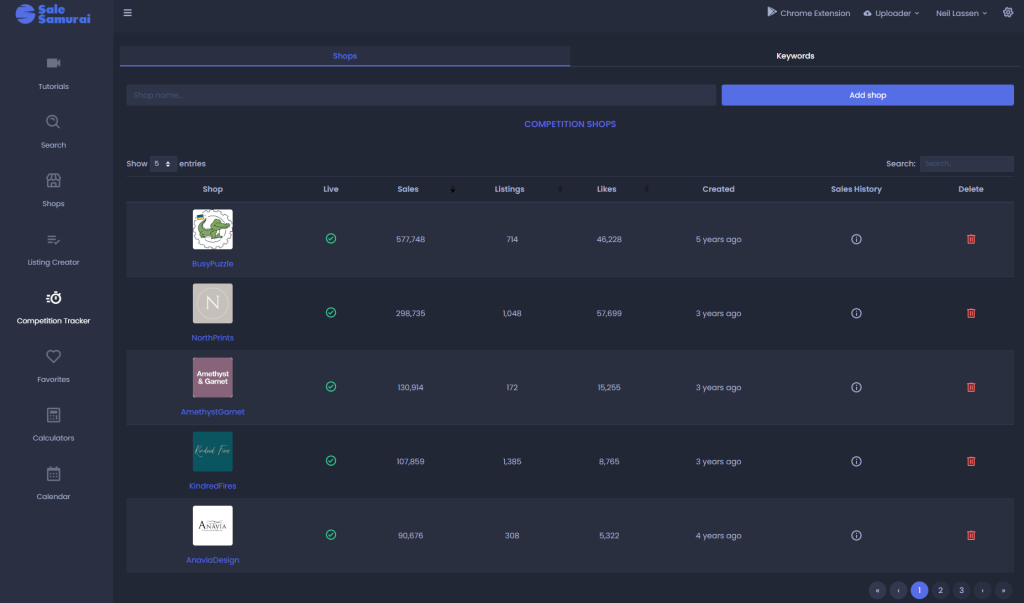
- Competition Tracker (Shop + Keywords tabs):
- Shop Tracker reveals sales history, number of listings, average reviews/day, and pricing changes for any Etsy shop.
- Keyword Tracker shows rank variance over time, helping you identify whether a keyword is seasonal or trending downward.
These modules help you emulate patterns of successful sellers while seeing keyword performance across weeks.
Use this to:
- Spot surging niches (e.g. “New Year resolution log” trending in Dec–Jan)
- Understand price position (competitive pricing)
- Benchmark your own listing tags, title, and review pace
For example, tracking Shop X shows steady +5–10 new reviews/week around university enrollment season—meaning educational themes might work.
4. Creating SEO-Optimized Listings in-App
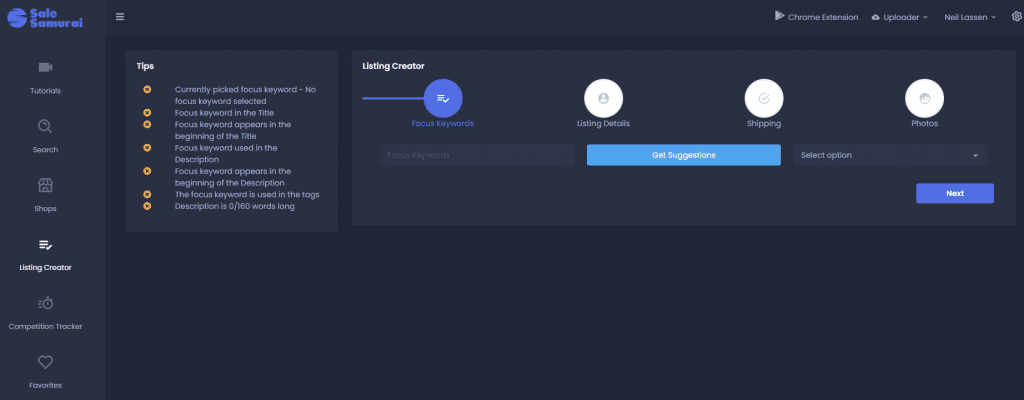
- Listing Creator Module: Mimics Etsy’s native listing creation, but with AI-powered optimization suggestions.
- Add a focus keyword, and it auto-suggests title structure, tag placements (max 13), pricing, shipping days, and image layout.
- Missing keywords in title/tags will be flagged in real-time, along with internal suggestions to bump focus terms to the first 40 characters.
When combined with keyword research from section 2, this tool ensures every listing is polished for Etsy algorithms before publishing. The built-in Grading System helps you close optimization gaps quickly.
5. Scaling Listings with Bulk Upload (POD Support)
- **Automatic Uploader Tool:**
Enables upload of multiple SKU variations (design + metadata) in bulk via CSV directly to your Etsy shop or connected POD platforms like Printful, Printify, and Gooten.
Perfect for quickly launching seasonal lines or theme variations.
Need 10 color variants of the same design? Upload once, adjust titles/tags via the CSV or interactive editor—then hit publish. Sales‑ready pages without repetitive work.
6. Tag Optimization and SEO Guidance
- Sale Samurai’s SEO guides and Analytics pages walk you through:
- How to front-load a keyword into the heading title (first 40 characters matter).
- Using all 13 tags efficiently—grouped by search volume and long-tail relevance.
- Avoiding common mistakes like tag duplication or title over-ranking.
The extension and search tools highlight missing tags used by competitors and underutilized niches. All of this helps you build cleaner, more effective metadata for conversion.
7. Driving Traffic via Influencer, Blog, & Social Strategy (Manual, But Data-Backed)
While Samurai doesn’t auto-export influencer contact lists, the intelligence it provides—particularly competition spikes on keyword trackers—lets you:
- Identify trending topics or seasonal niches
- Find relevant social creators (e.g. search TikTok for #petlogbook or #plannerflip)
- Reach out with personalized pitches informed by real keyword performance (e.g., “#newyeartracker is up 150% this December in US searches—thinking a TikTok readership post would drive preorders on your page”)
This strategy—paired with Samurai’s verified tag and search volume data—is used in guides like “How to Use YouTube Influencers to Promote Your Etsy Shop”. Samurai gives keywords and listing optimization; creators handle outreach.
8. Campaign Planning with Samurai Analytics
Here’s how to build a campaign timeline using Samurai inputs:
| Phase | Event / Action | Samurai Tool Used |
|---|---|---|
| Idea → Seed | Research < 5 keywords with volume + low competition | Search or Chrome Extension |
| Validation & Niche Proof | Track shop or keyword behavior over time | Competition Tracker (Shop + Keywords) |
| Listing Creation | Build optimized listing using best tags/title | Listing Creator (Grading feedback) |
| Launch at Scale | Publish variants across 5 designs | Automatic Uploader |
| Monitor & Refresh | Watch keyword rank, revenue trends over 4 weeks | Competition Tracker, Sold & Views charts |
| Pivot / Re-optimize | Refresh title or run ads based on tag performance | Listings Refresher & SEO live feedback |
In Samurai’s own user case studies, shops that consistently follow this workflow report an average 40–60% increase in listing visibility and 180% more keyword impressions.
Bonus: Sale Samurai Marketing Checklist (Downloadable!)
Below is a copy-paste friendly template for the strategic planner:
A. Pre-Launch Planning
- Identify 5–10 target keywords with >500 search volume & competiton grade C or lower
→ Export via Chrome extension or Search tool - Add 2–3 competitor shops/niche keywords to Competition Tracker
- Confirm BSR patterns or competition shift via week-over-week tracking
B. Listing Build
- Use Listing Creator with one focus keyword
- Ensure title tag starts with the primary keyword, tags mirror search variations
- Confirm shipping days and pricing align with comparable shops
C. Scale Variation
- Upload CSV via Automatic Uploader with design variations
- Adjust titles/tags for each color, pattern, or holiday theme
D. Post-Launch
- Monitor Competition Tracker for keyword rank and shop insights
- Refresh tags or title/description based on top-performing competitor tags
- Plan next launch phase using seasonal tool triggers (Easter, back-to-school, pet holidays)
Final Thoughts
Etsy marketing doesn’t have to be complicated if you’re working from solid, real-time data. Sale Samurai delivers live Etsy insights across keyword research, competition tracking, optimized listing workflows, and scalable uploads—all in one dashboard.
By following this structured marketing engine—research → optimize → scale → monitor—you can confidently launch product lines, plan influencer or email campaigns, and track performance goals using measurable metrics. The ROI? More visibility, higher conversion, and less “listing guessing.”
- Why Buyers Abandon Cart on Etsy (And How to Fix It)

- The Photo Story: Mockups That Feel Like Real Life (Not Floating PDFs)

- The “Set of 3” Spell: Why Triptychs Convert in Printable Wall Art
- The “Room” Strategy: Selling by Space (Kitchen, Nursery, Office, Classroom)

- Why Some Listings Get Clicks but No Sales: The Trust Gap Problem